
Traffic Car Pro - Driving Sim
DT Trading LabRacing
4.358.00 Reviews
- Version
- 1.0.6
- Installs
- 1.00M
- Age Rating
- Everyone
Screenshots
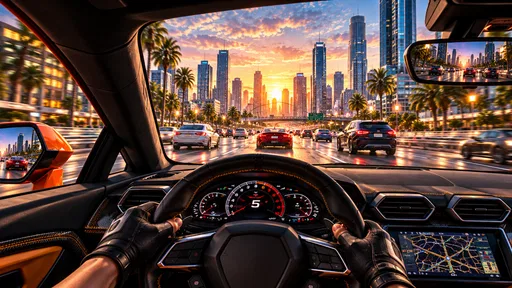


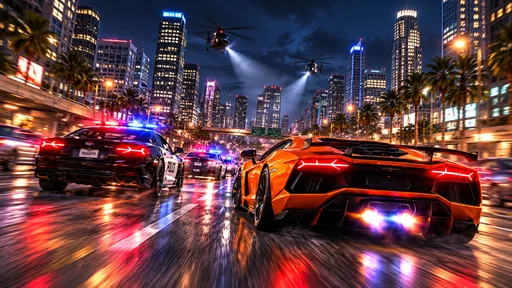

Our Review of Traffic Car Pro - Driving Sim
 Analysis by Appyee
I spent time with Traffic Car Pro - Driving Sim as a pick-up-and-play racing game, and my first impression was that it aims for quick decisions rather than a long tutorial or a highly technical driving simulation. Its basic appeal is easy to understand: you get behind the wheel, deal with traffic and changing road situations, and work through different ways to race. That makes it a natural choice for short sessions, especially when I want something more active than a puzzle but less demanding than a full console-style racer.
The game comes from DT Trading Lab and is free to play. It is listed for Everyone, so it is positioned as an accessible driving game rather than a mature or heavily competitive title. The store summary points to a selection of 21 cars, missions, endless roads, and duels. In practice, that combination suggests a useful mix: structured objectives when I want direction, open-ended driving when I want to relax, and direct challenges when I want a sharper test of timing.
What matters most with a game like this is not simply how many cars appear on the selection screen. The important question is whether the driving loop stays understandable when I make mistakes, whether the controls feel manageable on a phone, and whether the different modes give me a reason to return. My experience is that the game works best when approached as a compact arcade racer. It is less convincing if I expect deep vehicle tuning, a detailed career simulation, or the same precision as a dedicated racing game with a controller.
Getting past the first points of friction
The first place a player can get stuck is also the most ordinary one: deciding how to approach the game. A title that combines missions, endless roads, and duels can feel broader than it really is, and switching between modes too quickly may make the progression seem unclear. I found it more useful to treat each mode as serving a different mood instead of expecting all of them to be part of one carefully connected campaign.
Missions are the best starting point when I want a clear purpose. They give a session a beginning and an end, which is helpful on a small screen where I may only have a few minutes. Endless driving makes more sense when I want to practice staying alert and controlling the car over time. Duels are the option I would save for when I already feel comfortable with the steering and traffic rhythm, because a competitive challenge is less enjoyable when I am still learning the basic response of the car.
The most useful early habit is to learn the road rhythm before chasing speed. In a traffic racer, a fast move is only valuable if I can recover from it. I try to watch the gaps ahead, avoid making several lane changes in a row, and leave myself an escape route rather than aiming for the smallest possible opening. This is a simple adjustment, but it makes the game feel less random and helps separate a genuine mistake from a bad setup.
Another common sticking point is the expectation that every car will immediately feel like a clear upgrade. A larger selection does not automatically mean that each vehicle changes the game dramatically. I would judge a car by how comfortably I can place it in traffic, not only by whether it appears faster. A vehicle that feels predictable can be more useful for missions than one that rewards aggressive driving but punishes small corrections.
That is also why I would not rush through the available cars just to find a favorite. I would spend a few runs noticing which vehicle makes ordinary traffic easiest to read. If a car requires constant overcorrection, it may be a poor match for my playing style even if it looks more exciting. This is one of the less obvious trade-offs in a mobile racer: consistency often produces better results than maximum speed.
What to check before blaming the game
Before judging the driving, I would make a few basic checks. The game requires Android 7.0 or later, so compatibility should be confirmed before troubleshooting controls or performance. A phone that can install a game is not automatically a phone that will make every session feel smooth, particularly if other demanding apps are active in the background.
I also recommend starting with a short session rather than immediately committing to a long run. This gives me a chance to see whether touch input feels comfortable, whether the display responds consistently, and whether the device becomes warm or starts slowing down. Those checks are more useful than trying to compensate for an uncomfortable setup by changing my driving style.
Keeping the device free from unnecessary background activity is a practical step. Closing video, social, or other game apps can reduce interruptions and make touch response easier to judge. I would also make sure the phone has enough free storage for normal operation and that the operating system is not waiting for a restart. These are general maintenance steps, but they matter in a game where a delayed response can look like a steering problem.
If the game opens but a particular session feels unstable, I would first leave the mode, return to the main screen, and try a fresh run. That is safer than repeatedly forcing the application to close while a race is active. If the problem continues, restarting the device is a sensible next step. I would avoid deleting local game information as an early experiment, because that can remove progress or settings without proving what caused the issue.
Control comfort deserves its own check. I prefer to hold the phone with both hands and keep my thumbs in a relaxed position rather than gripping the edges tightly. A cramped grip makes small steering corrections harder and can create the impression that the car is overly sensitive. Playing while walking, riding in a vehicle, or using the phone at an awkward angle is also likely to make traffic judgment worse, even if the game itself is working normally.
Recovering a session after a mistake
When a run goes badly, my first response is not to change everything at once. I identify whether the problem was poor timing, an overly ambitious lane change, or a response issue. If I moved too early, I slow my decisions down. If the car did not react as expected, I repeat a short run with a lighter grip and more deliberate input. This approach gives me useful feedback instead of turning every failure into a guess.
For missions, I like to separate the objective from the route I take to reach it. Trying to complete the goal while also driving as aggressively as possible creates unnecessary pressure. I focus on safe positioning first and then add speed once the traffic pattern feels readable. This is particularly helpful for players who normally play racing games by instinct; the mission format rewards controlled repetition more than one spectacular attempt.
Endless roads are useful as a recovery space because they let me practice without the mental load of a specific target. I use them to test how long I can maintain attention, when I start making rushed choices, and which kinds of traffic gaps cause trouble. That makes the mode more than a way to pass time. It can act as a personal calibration run before returning to missions or duels.
Duels require a slightly different mindset. I would not enter them immediately after a frustrating failure and expect the competitive format to repair my confidence. Instead, I use one or two calmer runs to regain control, then try a duel when I can concentrate on timing. If the result is poor, I treat it as information about my current consistency rather than proof that the car or mode is unfair.
One practical workflow is to keep sessions short and purposeful: use a mission to pursue a concrete goal, switch to endless driving to settle into the controls, and finish with a duel only when I still have enough attention left. This avoids the common mobile-game trap of continuing after concentration has dropped. In a traffic-focused racer, tired decisions are often more damaging than a lack of speed.
If progress appears not to behave as expected, I would first return to the main menu and allow the current activity to finish normally before closing the game. I would then reopen it and check whether the situation is unchanged. If the issue is limited to one mode, I would continue using another mode temporarily rather than repeatedly restarting the entire app. That does not solve every possible problem, but it is a sensible way to protect a playable session while narrowing down the cause.
When the phone, connection, or expectations are the real issue
Not every unpleasant run is caused by the game. A crowded screen, poor lighting, a smudged display, or a case that interferes with how I hold the phone can all affect steering. Even my own position matters: playing with one hand while multitasking makes precise driving much less reliable. I get a fairer impression when I test the game in a stable position with the screen clean and my attention on the road.
Performance can also be confused with control difficulty. If the image stutters or the phone is busy with other tasks, a late visual update may make an input feel delayed. I would compare a fresh run after closing background apps with the same run under normal conditions. If the difference is obvious, the practical answer is to reduce the load on the device rather than assuming the game needs a different driving technique.
There is another expectation issue worth mentioning. The word “driving” can lead some players to expect a realistic simulator with detailed physics, broad customization, and carefully modeled roads. I would not choose this game for that purpose. Its appeal is closer to accessible arcade racing, where quick reactions and traffic awareness matter more than reproducing every part of real-world driving.
Players who want a deep vehicle-building system, a large competitive community, or a long-form story may be happier with a more specialized racing alternative. A traditional track racer is a better fit when I want repeated laps and braking points. A serious simulator is better when I want realism and a controller-friendly experience. A casual endless runner may be better when I want an even simpler one-thumb session. Traffic Car Pro sits between those options by combining several driving formats without presenting itself as a full replacement for any one of them.
It is also not the ideal choice for someone who dislikes repeating short attempts. Traffic traffic patterns and timing-based mistakes naturally encourage retries, and the satisfaction comes from gradually making cleaner decisions. If I need a game that lets me make progress without much concentration, this may feel demanding in the wrong way. Conversely, if I enjoy improving a route through small adjustments, the repeated runs have a clear purpose.
The game’s broad availability helps its case. It has passed one million installs and holds an average rating of 4.3 from around 1.4 thousand ratings, which suggests that it has attracted a substantial audience while still leaving room for mixed experiences. I would read those figures as a reason to try it, not as a guarantee that its controls will suit every phone or player. The current version is 1.0.6, so I would keep the app updated through the normal store process when possible.
Who will enjoy it most
I think the strongest audience is the player who wants a free racing game that can fill a short break without requiring a long tutorial. The combination of missions and endless roads gives me a choice between structure and relaxation, while duels add pressure for moments when I want more intensity. The Everyone age rating also makes it easier to recommend as a broadly accessible driving game, provided the player is comfortable with repeated traffic challenges.
It works particularly well in everyday situations where I have a limited amount of time. For example, if I am waiting for an appointment, I can play one mission instead of starting a game that demands a long uninterrupted session. If I have more time, I can use endless driving to settle into the controls and then try a duel. That flexible session length is more valuable to me than a complicated progression system would be on a phone.
I would skip it if my priority is realism, extensive customization, or a carefully balanced track-racing competition. I would also be cautious if my phone is close to the minimum operating-system requirement and already struggles with other games. The game may still be worth testing, but I would not assume that a compatible device will deliver the most comfortable experience. A smoother, simpler racer could be a better choice for older hardware.
DT Trading Lab has kept the basic proposition easy to understand: choose a car, select a driving situation, and try to stay in control. That simplicity is a strength when I want immediate action, but it also means players looking for a rich simulation should adjust their expectations before installing it. I found the game more enjoyable once I stopped asking it to be a different kind of racer.
My practical verdict
After using it, I see Traffic Car Pro - Driving Sim as a straightforward mobile racing game with enough variety to support more than one type of session. The 21-car selection, mission structure, endless roads, and duels give it a useful range, while the free price removes the biggest barrier to trying it. I especially like that I can choose between a defined objective and a relaxed run depending on how much attention I have available.
Its limitations are just as clear. The game is not where I would go for simulation depth, elaborate tuning, or a substitute for a dedicated track racer. Touch control comfort, device condition, and personal tolerance for repeated attempts will strongly influence the experience. Some frustration that looks like a game issue may actually come from playing one-handed, running too many apps, or expecting realistic handling from an arcade-focused design.
My recommendation is to begin with a mission, use endless driving as a practice tool, and leave duels until the controls feel natural. Keep the first sessions short, make one adjustment at a time when something feels wrong, and judge cars by how reliably they handle traffic rather than by appearance alone. For quick, accessible racing with several ways to play, this is worth a try; for realism and deep long-term progression, I would choose another category of racer.
Privacy and Permissions
See what permissions an app requests and how it handles your data.
- Wi-Fi connection information
- view Wi-Fi connections
- Other
- view network connections, full network access, control vibration, prevent device from sleeping, Google Play license check
Verdict
Strengths of Traffic Car Pro - Driving Sim
- Realistic traffic makes each drive feel engaging and unpredictable.
- Multiple camera angles improve visibility and driving immersion.
- Simple controls are easy to learn for casual players.
- Short sessions work well for quick mobile gaming breaks.
- Progressive challenges provide motivation to keep practicing.
Limitations of Traffic Car Pro - Driving Sim
- Traffic patterns can feel repetitive after extended play.
- Some vehicles and features may require significant grinding.
- Performance may vary on older or budget devices.
- In-game advertising can interrupt the driving experience.
- Limited customization may disappoint players seeking deeper options.
Other Releases by DT Trading Lab
View All
Traffic Bike Rider Rush
Racing4.3
Similar Picks in This Category
View All
Hill Climb Racing
Fingersoft4.3

Dr. Driving
SUD Inc.4.2

Traffic Rider
skgames4.5

Asphalt 8 - Car Racing Game
Gameloft SE4.6

Race Master 3D: Car Racing
Beresnev Games4.6

Extreme Car Driving Simulator
AxesInMotion Racing4.3
Frequently Asked Questions
What is Traffic Car Pro - Driving Sim?
Traffic Car Pro - Driving Sim is a mobile driving game focused on navigating busy roads while avoiding collisions and maintaining control of your vehicle. It combines traffic-based challenges with simulation-style driving, giving players opportunities to practice steering, lane changes, braking, and overtaking. The main appeal is its straightforward gameplay, where careful driving and quick reactions are more important than complex story elements.
Is Traffic Car Pro - Driving Sim suitable for beginners?
Yes, the game can be suitable for beginners, especially for players who enjoy learning controls gradually through short driving sessions. New users may need some time to become comfortable with steering, acceleration, braking, and traffic timing. It is worth starting with slower vehicles or easier situations if those options are available, because faster traffic and tighter gaps can make early attempts feel demanding.
Does Traffic Car Pro - Driving Sim require an internet connection?
The connection requirements may depend on the version installed and the features being used. Basic driving gameplay is often designed to work offline, but advertisements, online services, updates, cloud-related functions, or certain extra content may require internet access. Before traveling or playing with limited data, open the game once, test its main modes, and check the store listing for the latest connectivity information.
Are there advertisements or in-app purchases in Traffic Car Pro - Driving Sim?
Players should expect that a free mobile driving game may include advertising and optional purchases, although the exact arrangement can vary by platform and update. Ads may appear between attempts or while unlocking rewards, while purchases can potentially provide vehicles, currency, upgrades, or an ad-free experience. Review the payment details carefully before confirming anything, particularly if children use the device.
What devices are compatible with Traffic Car Pro - Driving Sim?
Compatibility depends on the operating system, device model, and the minimum software version required by the current release. The game should run best on relatively recent Android phones, iPhones, and tablets with sufficient storage and memory, while older devices may experience slower loading, reduced graphics quality, or occasional performance issues. Check the official Google Play or App Store page before downloading to confirm requirements.
Play our best games!


